Semrush MCP links your AI assistants directly to live Semrush data. Query keyword rankings, traffic breakdowns, and competitive intelligence in natural language without exporting CSVs, copying dashboards, or manually feeding context into prompts.
Connect ChatGPT, Claude, Gemini, Perplexity, Cursor, VS Code, or Claude Code to Semrush in minutes. One setup gives every team member access to the same live data source, allowing them to ask different questions to get consistent, yet specific, answers.
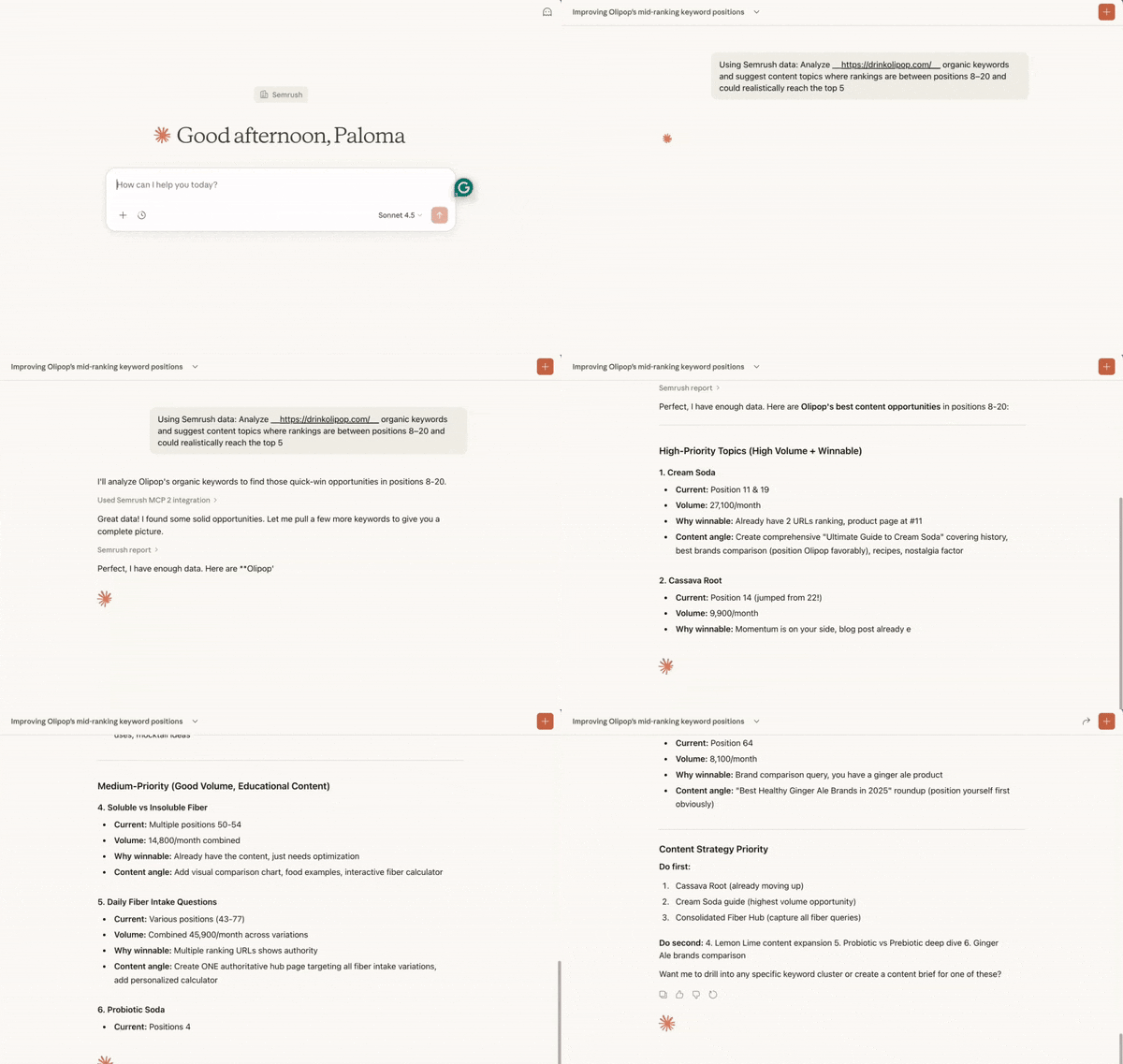
How can Semrush MCP help me?
Access live Semrush data directly in your AI assistant
Ask questions about keyword rankings, traffic breakdowns, or competitor performance. Your AI assistant retrieves the latest Semrush data and includes it in its response. No need to export files or copy information between platforms.
Set up monitoring workflows
Configure AI assistants to track competitor activity, monitor keyword movements, or identify traffic pattern changes on regular schedules. This helps teams spot important shifts earlier, rather than waiting for periodic reports.
One data source, multiple perspectives
SEO teams can investigate ranking changes. Marketing leaders can assess competitive shifts. Product teams can validate feature decisions with search demand data. When connected to their AI assistants, team members with Semrush seats can query the same live data but ask different questions based on their specific roles and priorities, eliminating data silos and outdated snapshots.
Who is it for?
Semrush MCP is built for marketing teams who need faster access to search and competitive data. It's designed to serve different roles across SEO, marketing leadership, and product teams.
SEO teams
SEO professionals use MCP to monitor ranking changes, analyze competitor keyword strategies, and identify content opportunities. Instead of building custom reports for each question, they can ask their AI assistant directly and get data-driven answers in seconds.
Marketing leaders (CMOs, VPs of Marketing)
Marketing executives use MCP to understand competitive market movement and assess strategic risks. They can request high-level summaries of competitor performance, traffic trends, and share-of-voice shifts without navigating through detailed dashboards or waiting for analyst reports.
Marketing Agencies
Agencies use MCP to streamline client work and accelerate new business. They can automate client reporting with custom layouts and formats, quickly analyze a prospect's digital visibility, and deliver competitive audits during the sales process. This reduces manual report preparation while maintaining consistent quality across multiple client accounts.
Growth and product teams
Product managers and growth marketers use MCP to validate feature ideas with real search demand data. They can identify which competitor features are driving traffic growth, spot emerging use cases, and prioritize roadmap decisions based on actual market signals rather than assumptions.
How does it work?
Semrush MCP uses the Model Context Protocol (MCP) to connect AI assistants with live data sources. MCP acts as a bridge, allowing your AI assistant to request specific data from Semrush and incorporate it into its responses.
Authentication and setup
You connect your AI assistant to Semrush using OAuth or an API key. This authenticates your access and establishes permissions. The setup process is handled through your AI assistant's integration settings or app marketplace.
Direct access
Semrush MCP is available as an official app in ChatGPT, Claude, and Perplexity. This means you can connect it directly through the app marketplace of these AI assistants. Learn here how to connect Semrush MCP to each AI assistant.
How AI assistants request data
When you ask a question, your AI assistant identifies what Semrush data it needs to answer. It sends a request through the MCP connection to Semrush's APIs, retrieves the relevant information, and uses that data to generate its response.
Cross-platform compatibility
MCP is an open standard, which means the same connection will work across different AI assistants. You can connect your Semrush account to ChatGPT, Claude, Cursor, VS Code, or Claude Code—whichever platform fits your workflow. If you use multiple AI assistants, you can connect your Semrush account to each one separately using the same credentials.
Data security
The connection uses read-only access, meaning your AI assistants can retrieve Semrush data but cannot modify or delete it. Your API credentials remain secure, and all data requests follow Semrush's standard authentication protocols.
What Semrush data does the MCP provide?
Semrush MCP provides access to Semrush's SEO, traffic, and competitive data through your AI assistants. What you can query depends on your Semrush subscription and API access.
Keyword data
- Search volume
- Keyword difficulty
- Ranking positions
- SERP features
- Related keyword suggestions
Organic and paid search metrics
- Organic keyword rankings
- Paid keyword data
- Estimated traffic
- CPC values
- Ad copy analysis
Competitive intelligence
- Competitor keyword overlap
- Traffic share analysisbacklink profiles
- Referring domain data
Traffic and market data
- Traffic breakdowns by source (organic, paid, direct, referral)
- Geographic performance
- Audience insights
- Market trends
Domain and backlink analysis
- Domain authority scores
- Backlink quality metrics
- Referring domains
- Anchor text distribution
Which Semrush plans include MCP access?
The Semrush MCP is available across Semrush One, SEO Classic, and Trends API plans.
To connect SEO data to your AI workflows, you need one of the following plans:
- Semrush One Starter
- Semrush One Pro+
- SEO Classic Pro
- SEO Classic Guru
All of these plans include 50,000 MCP API units that refresh on your subscription renewal date.
If you need more MCP API units, upgrade to one of the following plans instead:
- Semrush One Advanced + an MCP API units package
- SEO Classic Business + an MCP API units package
MCP API units are available in scalable packages of 2 million, 5 million, 10 million, or 20 million units.
Once enabled, you can access Semrush SEO data directly from your AI-powered tools and workflows.
For access to Traffic Analytics and market data, you need a Trends API plan.
Visit your subscription settings to manage your plan or purchase unlimited API units.
Managing your API units
Every Semrush MCP query consumes API units. The number of available API units depends on your active Semrush subscription. Here are a few tips on how to manage its consumption:
- Be specific. Using "Top 50 keywords in the US" consumes fewer API units than "all keywords globally." Always specify the result count, database, and any filters.
- Cache strategically. The dashboard retrieves data from cached files instead of making live MCP calls. This means you only use API units when you refresh the dashboard, not every time someone accesses it.
- Follow up in a chain. Keep related questions together in one session. Context is carried over, allowing for more efficient batch queries.
- Check your units availability: Go to My Profile and select Subscription Info.